 Codex Design
CRM dashboard template.
A complete CRM admin dashboard for a sample sales team called Tideline, in three desktop screens: a leads table with KPIs and bulk actions, a pipeline board with a weighted forecast, and a lead record with its activity timeline and deal. The KPI strip and pipeline summary double as a small sales analytics dashboard. It is a React project with shadcn/ui components and Tailwind CSS v4, so Codex or Claude Code can clone it, swap in your data, and keep building.
Updated November 21, 2026
Website · 3 pages · Free and open source
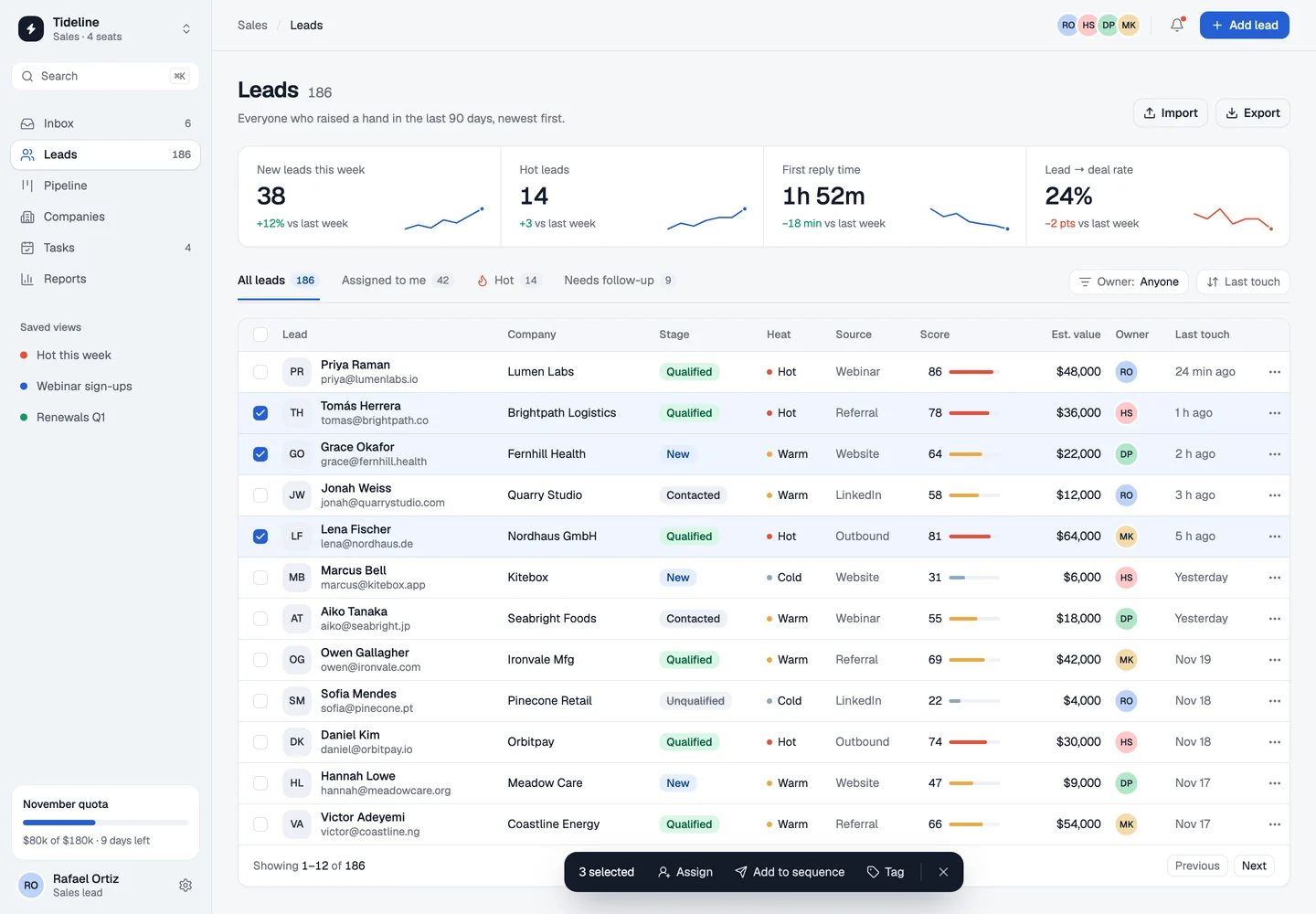
01Leads 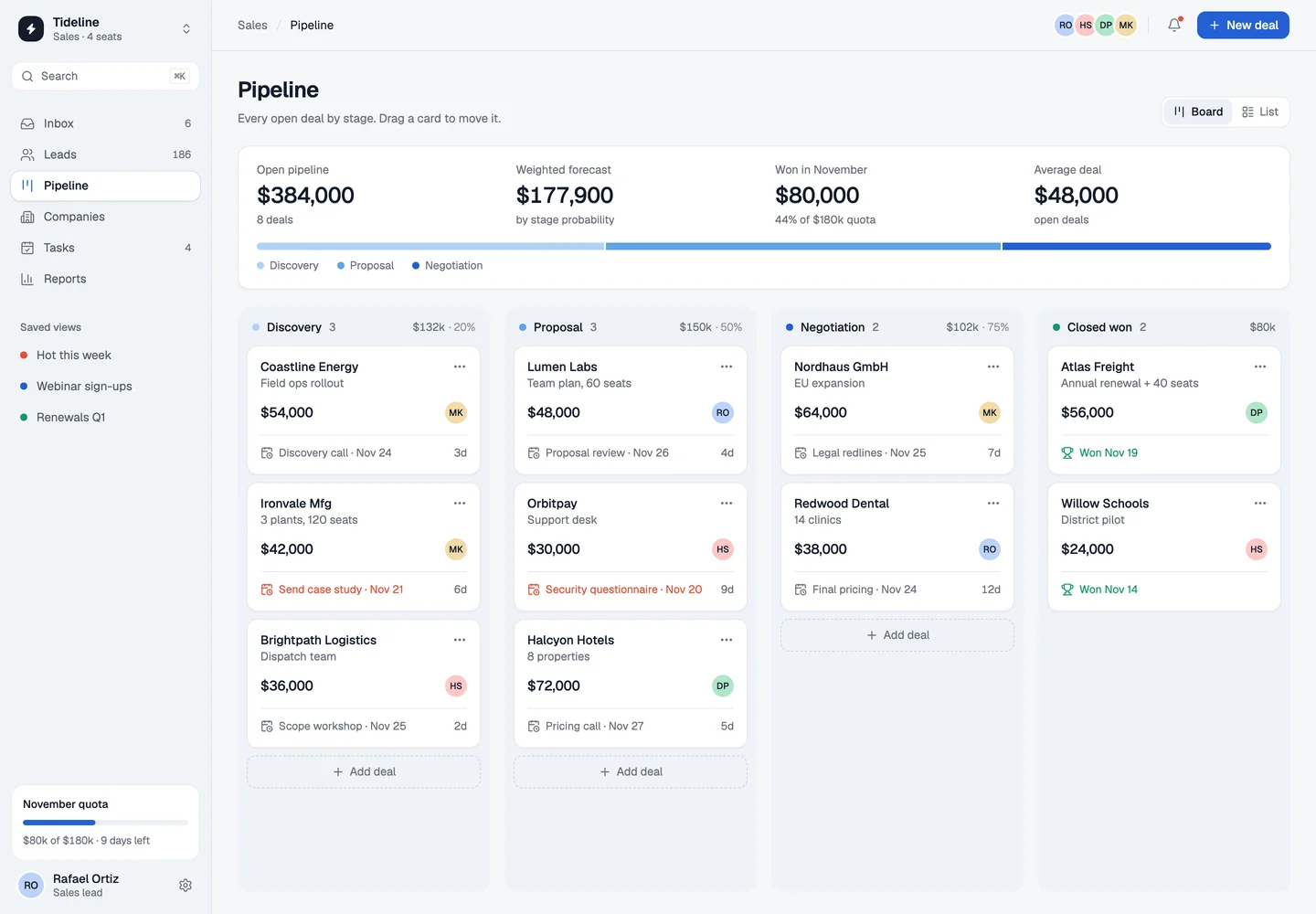
02Pipeline 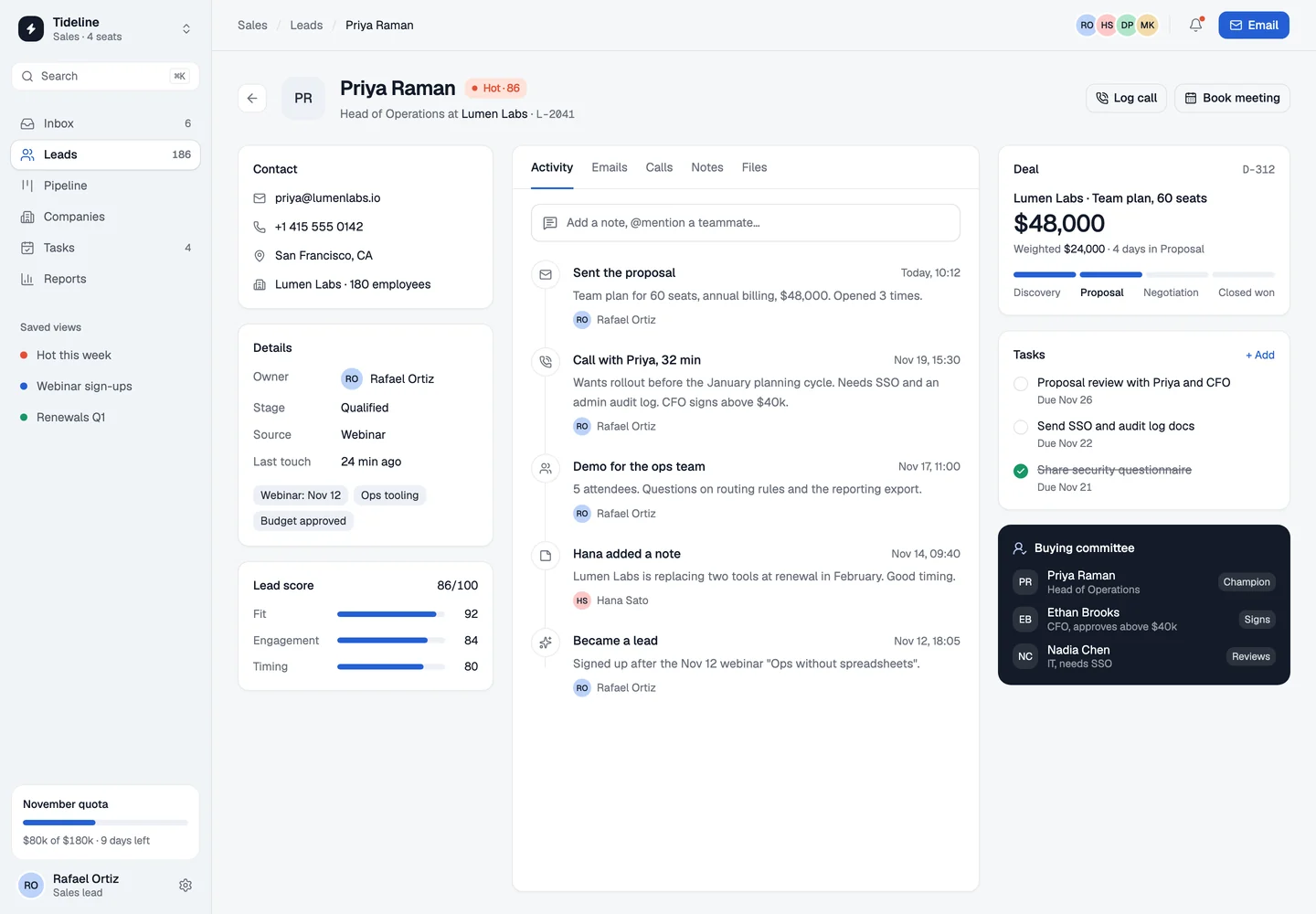
03Lead record
Clone it
npx degit ummydev/ui-templates/shadcn/crm-dashboard my-app
Copies just this template into a new folder, without the rest of the repository.
Make it yours
This is the CRM dashboard template from codexdesign.io. Rename it to [your product], replace the sample data with [your features], and keep every screen on the design system in DESIGN.md.
Paste this into Codex or Claude Code in the new folder.
Design system
TidelineWebCool paper, navy ink and one cobalt accent, for people who live in tables.Headings in Geist- Built with
- React · shadcn/ui · Tailwind CSS v4 · Lucide icons
What’s in the template
| Screen | What’s on it | Components used |
|---|---|---|
| Leads | Four KPIs with sparklines, tabs with counts, a 12-row lead table and a bulk-action bar | shadcn/ui Table and Button, SVG sparklines, score bars, Lucide icons |
| Pipeline | Pipeline summary, a stacked stage bar and a board of four stages with deal cards | shadcn/ui Button, Tailwind panels and deal cards, Lucide icons |
| Lead record | Contact, details and lead score, an activity timeline, the deal, tasks and who signs off | shadcn/ui Button, Tailwind timeline and stage progress, Lucide icons |
Every screen shares the same shell: a sidebar with search, navigation with counts, saved views and a November quota card, and a top bar with breadcrumbs, the team’s avatars and the page’s main action.
Leads
The leads screen opens with four KPI cells, each with its change since last week and a 7-point SVG sparkline: new leads this week, hot leads, first reply time, and the lead-to-deal rate. Below them are tabs with counts (All leads 186, Assigned to me 42, Hot 14, Needs follow-up 9), owner and sort chips, and a 12-row table with each lead’s company, stage, heat, source, score bar, estimated value, owner, and last touch. Three rows are selected, so a dark bar floats at the bottom with Assign, Add to sequence, and Tag.
Pipeline
The pipeline screen sums up the open pipeline ($384,000 over 8 deals), the weighted forecast ($177,900), what was won in November ($80,000, 44% of a $180k quota), and the average deal ($48,000), above a bar of the open stages stacked by value. Four columns, Discovery, Proposal, Negotiation, and Closed won, show each stage’s deal count and total, plus the win probability of the open stages, and each open deal’s card has its value, owner, next step, and days in stage. Next steps that are overdue turn coral.
Lead record
The record page is one lead, Priya Raman, Head of Operations at Lumen Labs (lead L-2041), in three columns: her contact details, lead details, and a score breakdown on the left, and the activity timeline in the middle: the proposal email, a call, a demo, a teammate’s note, and the day she became a lead. On the right are her deal, D-312 for $48,000 in Proposal, with its progress through the stages, her tasks, and a dark panel for the buying committee.
How it’s built
The sample data is one made-up sales team’s November in US dollars. Every screen reads from src/data.ts, and the pipeline totals are computed from its deals, so the screens agree: the eight open deals add up to $384,000, weighting them by stage probability (20% for Discovery, 50% for Proposal, 75% for Negotiation) gives the $177,900 forecast, and the two closed-won deals make the $80,000 on the sidebar’s quota card. Priya’s lead and her deal are the same $48,000. All names, companies, and numbers are fictional.
Each screen is a React component (src/leads.tsx, src/pipeline.tsx, and src/lead.tsx) inside a shared shell in src/shell.tsx, laid out at 1440×1000 for a desktop screen; open /?screen=leads, /?screen=pipeline, or /?screen=lead to switch between them. They use shadcn/ui’s Table and Button and Lucide icons, the sparklines are plain SVG, and the Tideline theme is shadcn’s CSS variables in src/index.css, plus a few colors of its own for lead heat, won deals, and teammates’ avatars. It runs with Vite: npm install, then npm run dev.
Use it with Codex or Claude Code
Copy just this template from the ui-templates repository:
npx degit ummydev/ui-templates/shadcn/crm-dashboard my-crm
cd my-crm && npm install && npm run dev
Then ask your agent to make it yours:
This folder is a CRM dashboard template in React, shadcn/ui and Tailwind. Turn it into [your product], for [who it's for]. Keep DESIGN.md and the theme in src/index.css as the design system, replace the sample leads and deals in src/data.ts with [your data], and keep every total computed from it. Then add [the pages you need] and connect it to [your data source].
Because the design system is written down in DESIGN.md, the pages your agent adds next, such as the inbox, companies, tasks, or reports that the sidebar already names, will match the three screens.
Built on the Tideline design system
The template uses Tideline, a design system for CRM and admin dashboards: cool paper, navy ink, one cobalt accent, hairline borders, Geist with Geist Mono for IDs, and 10px corners, with color kept for meaning such as lead heat, deal stage, and overdue steps. Its page has a live preview, the full DESIGN.md, and a shadcn theme with light and dark colors.
Frequently asked questions
Is this CRM dashboard free?
Yes. It’s open source under the MIT license, for personal and commercial projects.
How do I use it with Codex or Claude Code?
Copy it with npx degit ummydev/ui-templates/shadcn/crm-dashboard my-crm, open the folder in Codex or Claude Code, and paste the prompt above with your product filled in. The agent reads DESIGN.md for the design system and src/data.ts for the sample data, so it can swap in your records and add new screens that match the three it starts with.
Can I use it with Next.js?
Yes. It’s a Vite project, but the parts are standard React, shadcn/ui, and Tailwind CSS v4, so your agent can move the screens, src/shell.tsx, the components in src/components/ui, and the theme in src/index.css into a Next.js app. Ask it to keep DESIGN.md so the design survives the move.
Does it work on a phone?
Not yet. The three screens are laid out for a 1440-pixel desktop screen. Ask your agent to add a phone layout if your team needs one.
Is there a dark theme?
Not in the template, which is designed in light mode. The Tideline shadcn theme on the design system page includes dark colors to start from.