Mobile app UI design prompts.
Nine prompts for designing the screens of an iOS or Android app with Codex. Start with the brief, then design screens in the order users meet them. Replace the details in brackets with your own, and keep each screen in its own HTML file at phone size.
Updated November 2, 2026
Start with a brief and a screen list
App brief and screen list
We're designing [Pagely, a reading-habit app]. Users are [adults who want to read 10–30 minutes a day but keep forgetting]. The core loop: [set a daily goal, read with a timer, keep a streak]. Platform: [iOS first].

List every screen the first version needs, grouped into onboarding, core loop, and settings. For each screen, give its purpose in one sentence and the three most important things on it.
Design the onboarding flow
Design connected screens together so they share one visual language. Ask for the flow, not single screens.
Onboarding flow
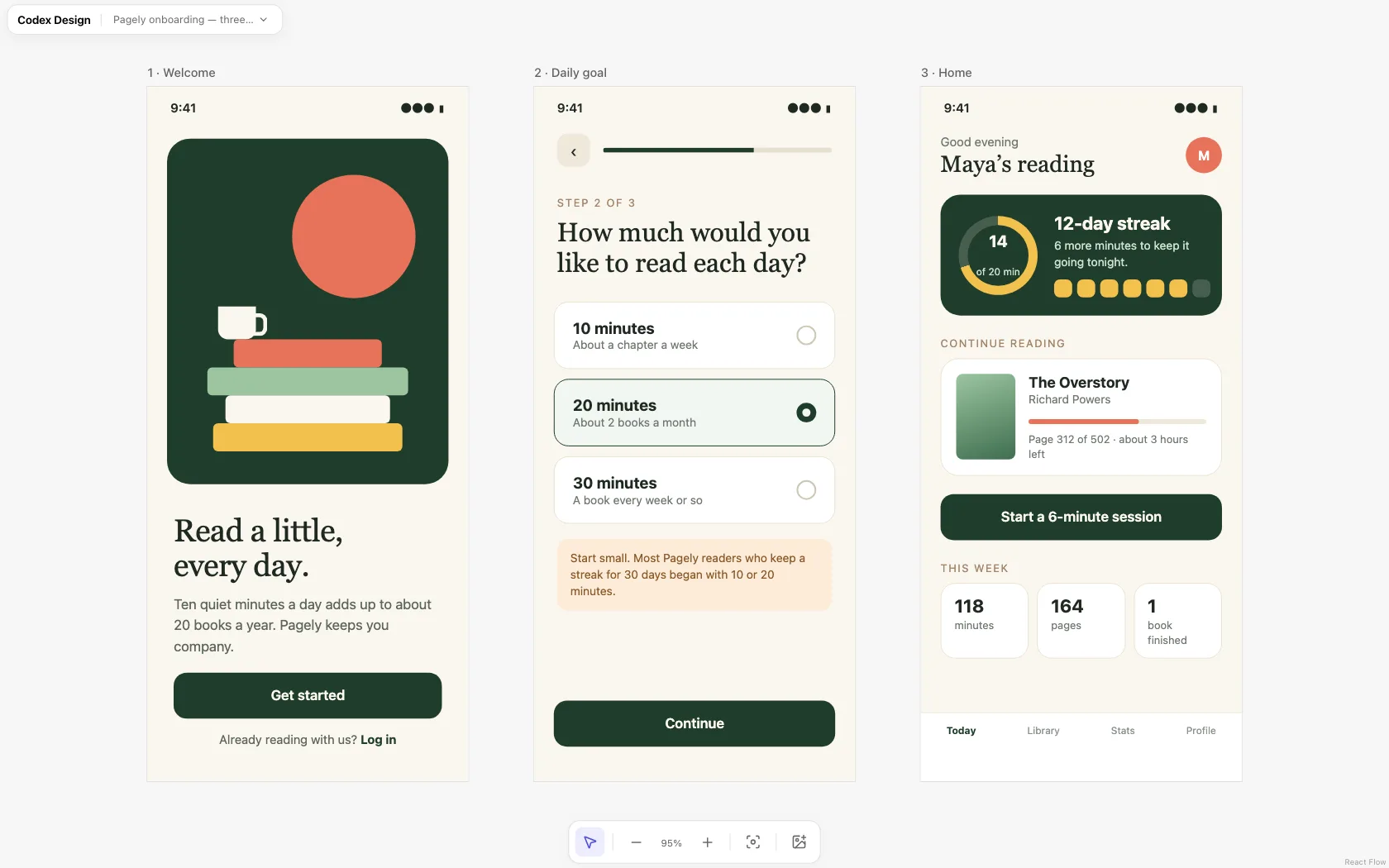
Design the onboarding flow as three screens: welcome, choose a daily goal, and the first home screen. Each screen is its own self-contained HTML file at 390×844 with inline CSS and system fonts. Use one consistent style across all three: [warm cream background, deep green for actions, one coral accent, a serif for headlines]. Show a progress indicator on the goal screen, and draw any illustration with CSS.
Design the home screen
Home screen
Design the home screen for a returning user on day [12] of their streak. The most important element is [today's progress toward the daily goal]; make it the first thing you notice. Below it: [the book they're reading with page progress], a primary button to [start a session], and [this week's stats]. Include a bottom tab bar with [Today, Library, Stats, Profile].
Design a list and a detail screen
List and detail
Design the [Library] list screen and the [book] detail screen as two files. The list shows [12 books] with cover, title, author, and progress, plus a search field and filter chips for [Reading, Finished, Want to read]. The detail screen opens from a list item and shows [reading history and notes]. Use realistic titles and numbers.
Design the settings screen
Settings screen
Design the settings screen using standard [iOS] grouped lists: [Account, Daily goal, Reminders, Appearance, Data and privacy, Help]. Show current values on the right of each row, use a toggle for [reminders], and put destructive actions like [Delete account] at the bottom in red.
Cover empty, loading, and error states
Real apps spend a lot of time in these states, and they are easy to forget until development.
Empty, loading, and error states
For the [Library] screen, design three more states as separate files: empty (a new user with no books, with one clear next step), loading (skeleton placeholders that match the real layout), and error (offline, with a retry button). Keep the navigation and header identical to the normal screen.
Add a dark mode
Dark mode
Create dark mode versions of the [home] and [library] screens. Don't just invert colors: use a dark [green-gray] background instead of pure black, lower the saturation of the accent, keep text contrast at WCAG AA or better, and tell me which colors you changed and why.
Match the platform
Platform conventions
Adapt the [home] screen for Android using Material 3 conventions: top app bar, navigation bar, and a floating action button for [start session] if it fits. Keep our brand colors and type. List what changed from the iOS version.
Turn the screens into code
Production code
Implement the approved onboarding and home screens in our [SwiftUI] app. Match the layout and spacing of the HTML files in [designs/], use the colors in [Theme.swift], support Dynamic Type, and reuse existing components where they fit.
Tips
- Use the real screen size. 390×844 for a modern iPhone, 412×915 for a typical Android phone.
- Design flows, not single screens. Consistency across screens matters more than any one screen looking great.
- Check thumb reach. Primary actions belong in the lower half of the screen.
- Use real content. Long names, big numbers, and empty fields reveal problems that sample data hides.