 Codex Design
Admin dashboard template.
A free admin dashboard template for a sample online store, Kestrel Outdoor: a complete admin panel with an analytics dashboard, orders, users, and roles and permissions, plus reports, in five desktop screens. It is an e-commerce admin dashboard in a dark theme, the first dark admin dashboard among the React templates here, with the full source in shadcn/ui, Tailwind CSS v4 and Recharts and its design system in a DESIGN.md, so Codex or Claude Code can clone it, swap in your data, and keep building.
Updated November 21, 2026
Website · 5 pages · Free and open source
01Overview 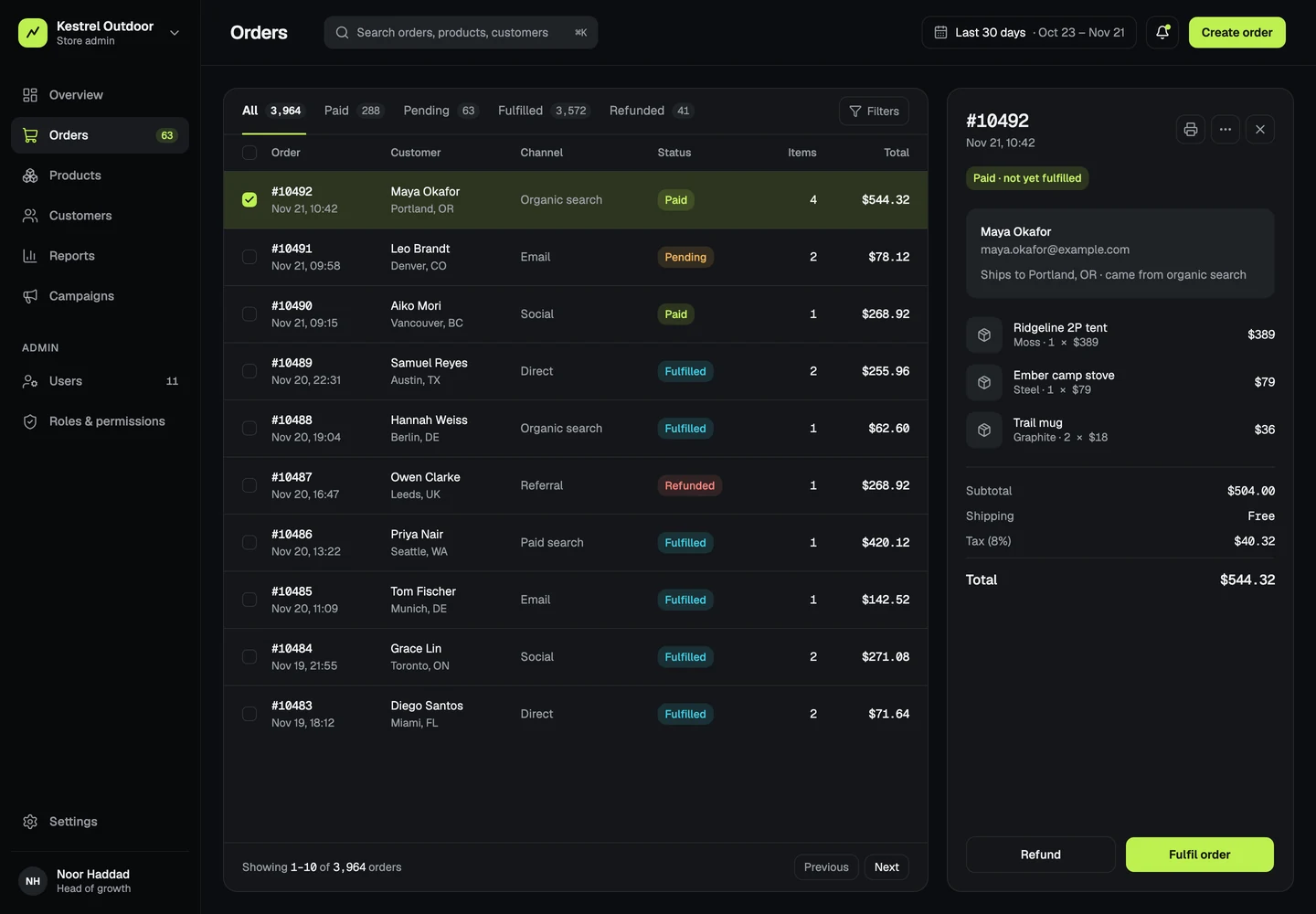
02Orders 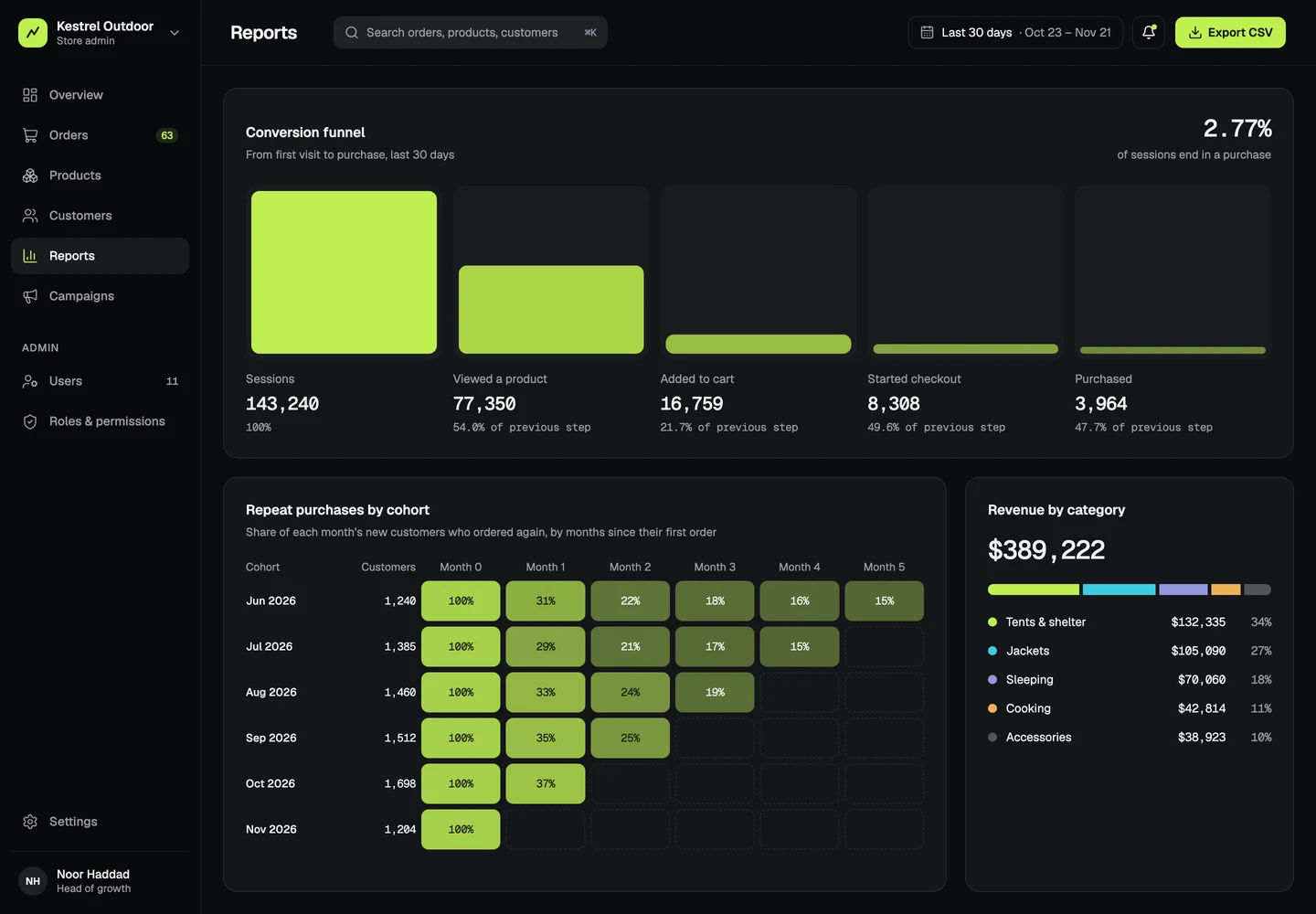
03Reports 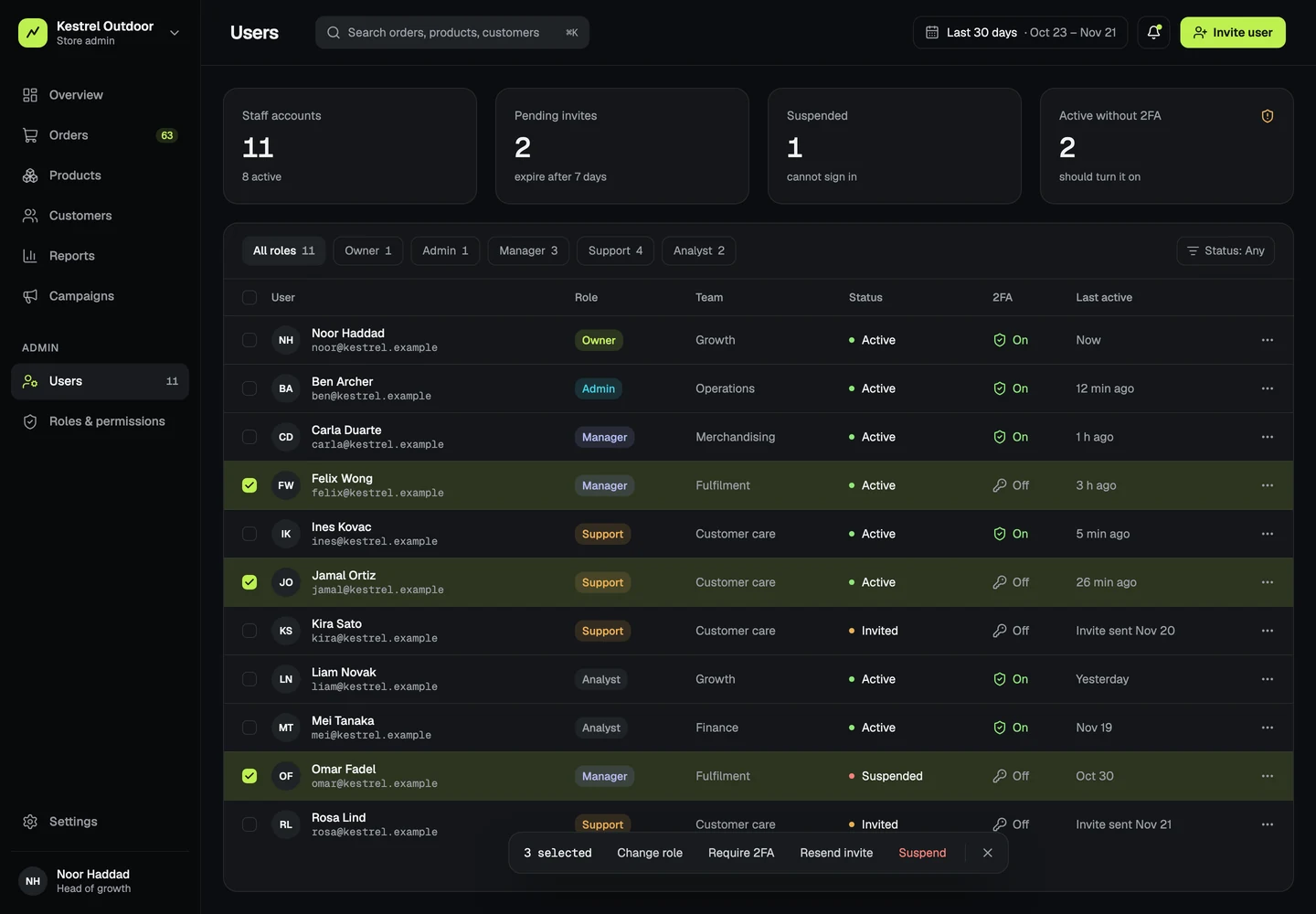
04Users 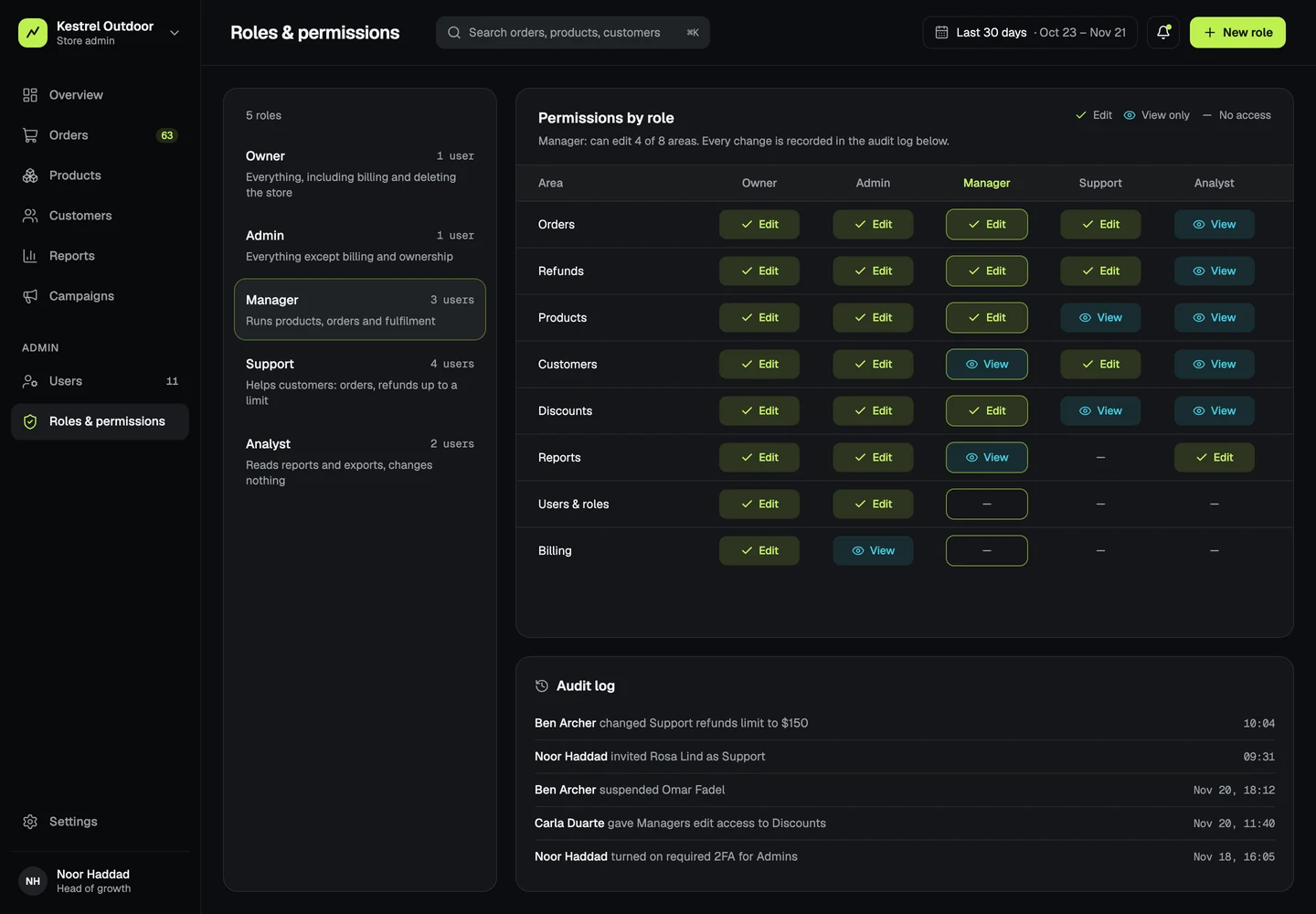
05Roles & permissions
Clone it
npx degit ummydev/ui-templates/shadcn/admin-dashboard my-app
Copies just this template into a new folder, without the rest of the repository.
Make it yours
This is the Admin dashboard template from codexdesign.io. Rename it to [your product], replace the sample data with [your features], and keep every screen on the design system in DESIGN.md.
Paste this into Codex or Claude Code in the new folder.
Design system
VantageWebGraphite night, one signal-lime accent and numbers that line up.Headings in Geist- Built with
- React · shadcn/ui · Tailwind CSS v4 · Recharts · Lucide icons
What’s in the template
| Screen | What’s on it | Components used |
|---|---|---|
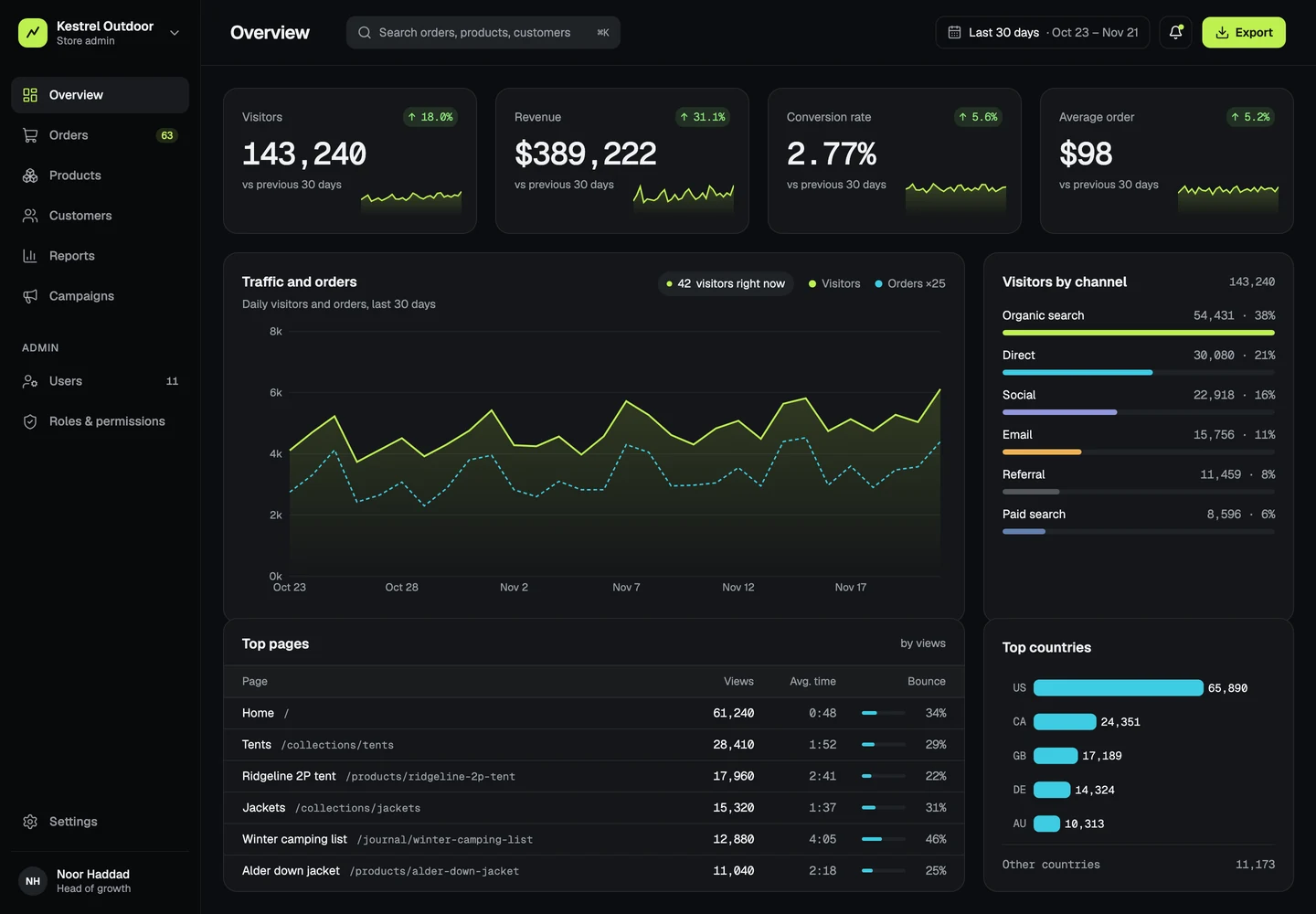
| Overview | Four KPI tiles with sparklines, a 30-day traffic and orders chart, visitors by channel, top pages and top countries | shadcn/ui Button, Recharts area and bar charts, Tailwind tiles, Lucide icons |
| Users | Four account stats, role filter chips, an 11-row staff table and a floating bulk-action bar | shadcn/ui Table and Button, Lucide icons |
| Roles & permissions | Five roles with user counts, a permission matrix of 8 areas by 5 roles, and an audit log | shadcn/ui Button, a Tailwind matrix, Lucide icons |
| Orders | Status tabs with counts, a 10-row orders table and an order detail panel with its totals | shadcn/ui Table and Button, Lucide icons |
| Reports | A five-step conversion funnel, a cohort repeat-purchase heatmap and revenue by category | shadcn/ui Button, Tailwind funnel bars, heatmap grid and stacked bar |
Every screen shares the same shell: a 220px sidebar with the store switcher, navigation with a badge for the 63 pending orders, an Admin section for Users and Roles & permissions, settings and the signed-in head of growth, and a top bar with the page title, a ⌘K search, the date range (last 30 days, Oct 23 – Nov 21), notifications, and the page’s main action.
Analytics dashboard
The overview screen is the analytics dashboard. Four KPI tiles compare the last 30 days with the 30 before, each with a 30-day sparkline: 143,240 visitors (up 18.0%), $389,222 in revenue (up 31.1%), a 2.77% conversion rate (up 5.6%), and a $98 average order (up 5.2%). Below them, a Recharts area chart plots daily visitors in lime and orders (scaled ×25) as a dashed cyan line, next to a chip with 42 visitors on the site right now. Visitors by channel splits the total across organic search, direct, social, email, referral, and paid search; a top pages table lists six pages with views, average time, and a bounce bar; and a bar chart shows the top five countries, from 65,890 visitors in the US down to 10,313 in Australia, with 11,173 more under Other countries.
User management
Four stats sum up the staff accounts: 11 accounts (8 active), 2 pending invites, 1 suspended, and 2 active users without two-factor authentication, flagged with a warning icon. Filter chips for all roles and for Owner, Admin, Manager, Support, and Analyst show how many people have each role, next to a status filter, and the users table lists each person with their initials, email, role badge, team, status, 2FA, and when they were last active. Three rows are selected, so a bulk-action bar floats at the bottom with Change role, Require 2FA, Resend invite, and Suspend.
Roles and permissions
The left column lists the five roles with how many users each has and one line on what it may do. The permission matrix sets Edit, View, or No access for eight areas (orders, refunds, products, customers, discounts, reports, users and roles, and billing) for every role, with the selected role, Manager, outlined in lime: Managers can edit 4 of the 8 areas. Below it, an audit log lists the latest changes, such as a new refund limit for Support and required 2FA for Admins.
Order management
Status tabs count every order in the period: All 3,964, Paid 288, Pending 63, Fulfilled 3,572, and Refunded 41. The orders table shows the latest 10, each with its order number and time, customer and city, channel, a status badge, item count, and total, and the first one is selected. The order detail panel on the right is that order, #10492: the customer, where it ships and which channel it came from, three line items, the subtotal, free shipping, 8% tax, and the $544.32 total, with Refund and Fulfil order buttons.
Reports
The conversion funnel follows the period’s 143,240 sessions to 3,964 purchases in five steps, sessions, viewed a product, added to cart, started checkout, and purchased, with each step’s share of the one before; 2.77% of sessions end in a purchase. Below it, a cohort heatmap shows what share of each month’s new customers, June to November 2026, ordered again one to five months later. Cells get brighter as the share rises, with dark text on the brightest ones so every number stays readable. Revenue by category splits the $389,222 across five categories in one stacked bar.
The screens are a static layout: the tabs, filters, bulk-action bar, and permission matrix show where everything goes, but they don’t filter, act, or save anything yet, and there is no sign-in or backend. That part is yours, or your agent’s, to connect.
How it’s built
The sample data is one made-up store’s last 30 days in US dollars, all in src/data.ts. Daily visitors, orders, and revenue come from a fixed formula, and the KPIs and their changes, the channel and country splits, both ends of the funnel (sessions are the visitors, purchases are the orders), the All and Fulfilled order counts, and each order’s totals are computed from them, so the screens agree: the 143,240 visitors on the overview are the funnel’s sessions and add up across channels and countries, and the 3,964 orders are the All tab. On the admin screens, every user, role, and status count and the “can edit 4 of 8 areas” line are computed from the users and permissions lists. The previous period’s totals, the Paid, Pending, and Refunded counts, the middle funnel rates, the top pages, and the cohort percentages are set by hand in the same file. All names, the store, and the numbers are fictional, and there are no photos.
Each screen is a React component (src/overview.tsx, src/users.tsx, src/roles.tsx, src/orders.tsx, and src/reports.tsx) inside a shared shell in src/shell.tsx, laid out at 1440×1000 for a desktop screen; open /?screen=overview, /?screen=users, /?screen=roles, /?screen=orders, or /?screen=reports to switch between them. They use shadcn/ui’s Button and Table, Recharts for the area charts, sparklines, and country bars, and Lucide icons; the funnel, heatmap, and permission matrix are plain Tailwind. The Vantage theme is shadcn’s CSS variables in src/index.css, dark from the start, plus green and coral for changes and Geist Mono for numbers. It runs with Vite: npm install, then npm run dev.
Use it with Codex or Claude Code
Copy just this template from the ui-templates repository:
npx degit ummydev/ui-templates/shadcn/admin-dashboard my-admin
cd my-admin && npm install && npm run dev
Then ask your agent to make it yours:
This folder is an admin dashboard template in React, shadcn/ui and Tailwind. Turn it into the admin panel for [your product], for [who uses it]. Keep DESIGN.md and the theme in src/index.css as the design system, replace the sample data in src/data.ts with [your metrics API], and keep every total computed from it. Then connect [your auth and backend], make [the filters, bulk actions and permissions you need] work, and add [the pages you need].
Because the design system is written down in DESIGN.md, the pages your agent adds next, such as the products, customers, campaigns, or settings that the sidebar already names, will match the five screens.
Built on the Vantage design system
The template uses Vantage, a dark design system for admin and analytics dashboards: graphite surfaces, one signal-lime accent with dark text, cyan as the second series, Geist with Geist Mono for every number, 16px tiles, and hairline borders with no shadows. Its page has a live preview, the full DESIGN.md, and a shadcn theme with the template’s dark colors and a matching light theme.
Frequently asked questions
Is this admin dashboard template free?
Yes. It’s open source under the MIT license, for personal and commercial projects, on GitHub at ummydev/ui-templates.
What is the difference between an admin panel and an admin dashboard?
Most people use the two terms for the same thing. When they’re used apart, an admin dashboard usually means the screen that shows how things are going, with KPIs, charts, and reports, and an admin panel means the whole back office where staff change things: orders, users, roles, and settings. This template has both: the overview and reports are the dashboard, and orders, users, and roles are the panel.
Does it include user management and role-based access control?
It includes the screens and sample data for both: a users table with role and status filters, 2FA status and bulk actions, and a roles screen with a permission matrix and an audit log. It has no sign-in and doesn’t check permissions: the matrix is a static layout of the sample roles in src/data.ts, and nothing is enforced. You connect your own auth and backend, and your agent can wire the screens to them.
Can I switch it to a light theme?
Not with a switch: the template ships in dark only, with its colors in :root in src/index.css. The Vantage shadcn theme on the design system page includes a light palette designed to match, with graphite buttons and lime labels. Ask your agent to put those light colors in :root, move the template’s dark colors under .dark (in place of the unused shadcn defaults there), and add a toggle.
How do I customize it with Codex or Claude Code?
Copy it with npx degit ummydev/ui-templates/shadcn/admin-dashboard my-admin, open the folder in Codex or Claude Code, and paste the prompt above with your product filled in. The agent reads DESIGN.md for the design system and src/data.ts for the sample data, so it can connect your metrics, make the filters and bulk actions work, and add screens that match the five it starts with.