 Codex Design
Claude Fable 5.2 for UI design.
Anthropic released Claude Fable 5.2 on November 9, 2026, its most capable model for technical work. We gave it the same three UI prompts we ran on GPT-6.1 Terra and Sol in Codex: a landing page, a SaaS dashboard, and a mobile app screen, with no design direction. Fable 5.2 skipped the usual AI tells, but it has a default look of its own.
Updated November 10, 2026 · 6 min read
The short answer
- Fewer AI tells than GPT-6.1. Our checker found no errors in any of Fable 5.2’s three screens: no emoji icons, no placeholder names. GPT-6.1 Terra and Sol had emoji icons in all six of theirs.
- It has its own default. Two of three screens came out cream with a serif headline and one warm accent color. The dashboard fell back to Inter and indigo, the most generic SaaS look there is.
- It is not the fastest. Each screen took 1 minute 39 seconds to 1 minute 55 seconds in Claude Code, about the same as GPT-6.1 Terra and quicker than Sol on the landing page.
- Direction still matters more than the model. With a design skill installed, the same prompts gave clearly different fonts and colors.
What’s new in Claude Fable 5.2
| Claude Fable 5.2 | |
|---|---|
| Released | November 9, 2026, with Claude Mythos 5.2 (same model, for verified organizations) |
| Model ID | claude-fable-5-2 |
| API price | $8 / $40 per million input / output tokens, down from $10 / $50 |
| Fast mode | Up to 2.5× faster output at $16 / $80, in Claude Code and the API |
| Context | 1M tokens in, 128K tokens out |
| Thinking | Adaptive thinking, always on; depth set by effort |
| Where | All paid Claude plans, Claude Code, the Claude API, Amazon Bedrock, Google Cloud, Microsoft Foundry |
Anthropic says Fable 5.2 improves coding, reasoning, and vision, and blocks about 55% fewer requests than Fable 5.1. On Pro plans and standard Team seats, Fable can use up to half of your weekly usage limit. Anthropic’s announcement makes no specific claims about UI or front-end design, which is why we tested it.
How we tested
We used Claude Code 2.1.319 with Fable 5.2 at the default effort, started in safe mode so no personal settings, CLAUDE.md, plugins, or installed skills could shape the result. Each prompt ran once in an empty folder, word for word the same as in our GPT-6.1 Terra vs Sol test:
- A landing page for Tally, an invoicing app for freelancers, with a hero, three features, two pricing plans, and a footer.
- The main dashboard of a subscription analytics app: MRR, churn, customers, a revenue chart, and recent events.
- The home screen of a habit tracker app at 390×844: today’s habits, a streak, and a bottom tab bar.
Each asked for one index.html with Tailwind from the CDN and gave no colors, fonts, or style. We took screenshots and ran the pretty-ui checker on every file. One run per prompt is a small test, not a benchmark.
The results
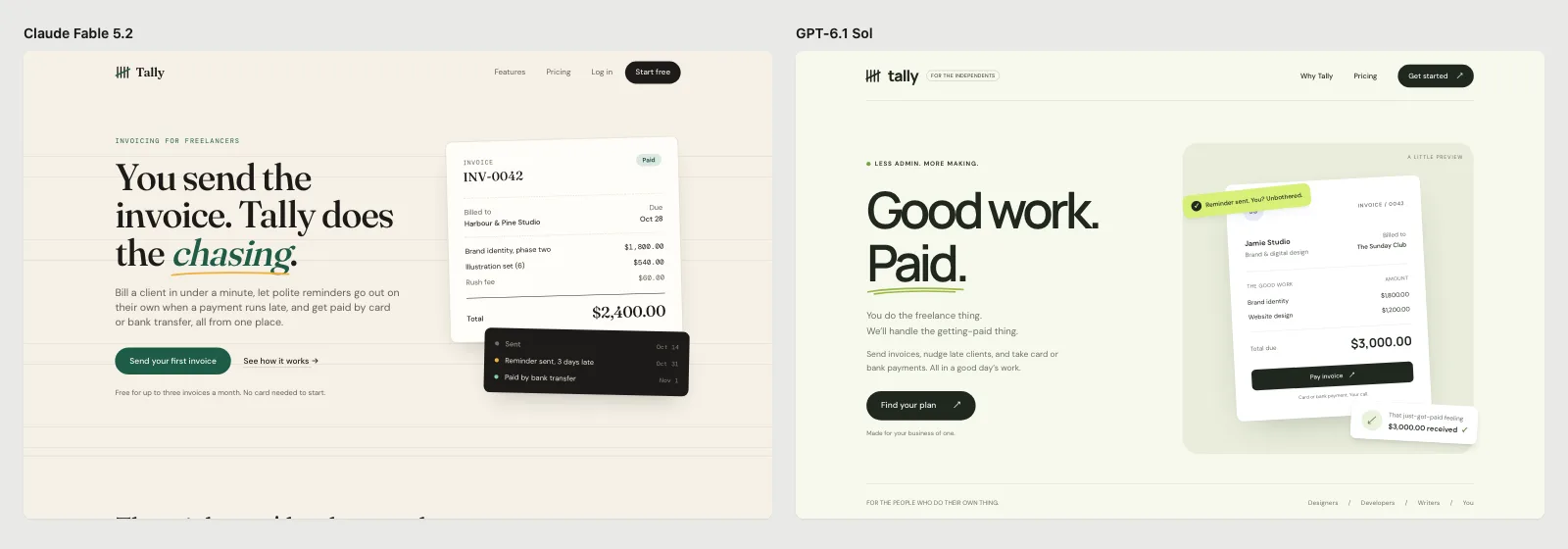
The landing page prompt. Fable 5.2 on the left, GPT-6.1 Sol on the right.
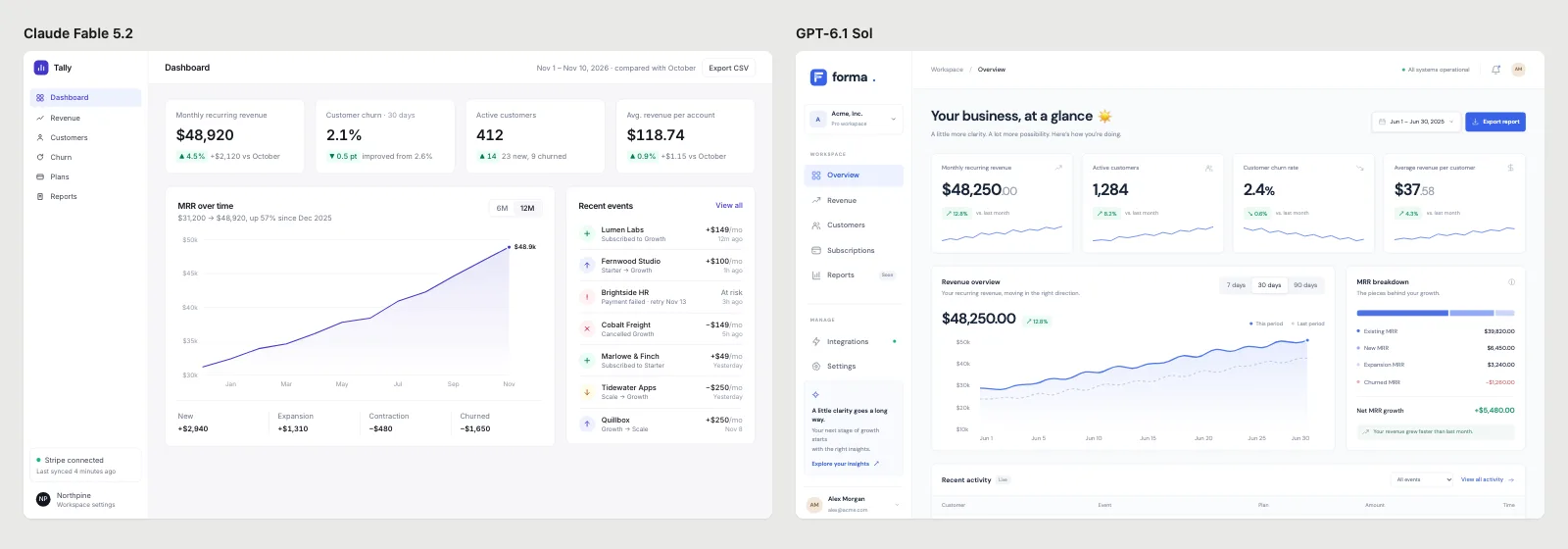
The dashboard prompt. All three models we tested put MRR near $48,000.
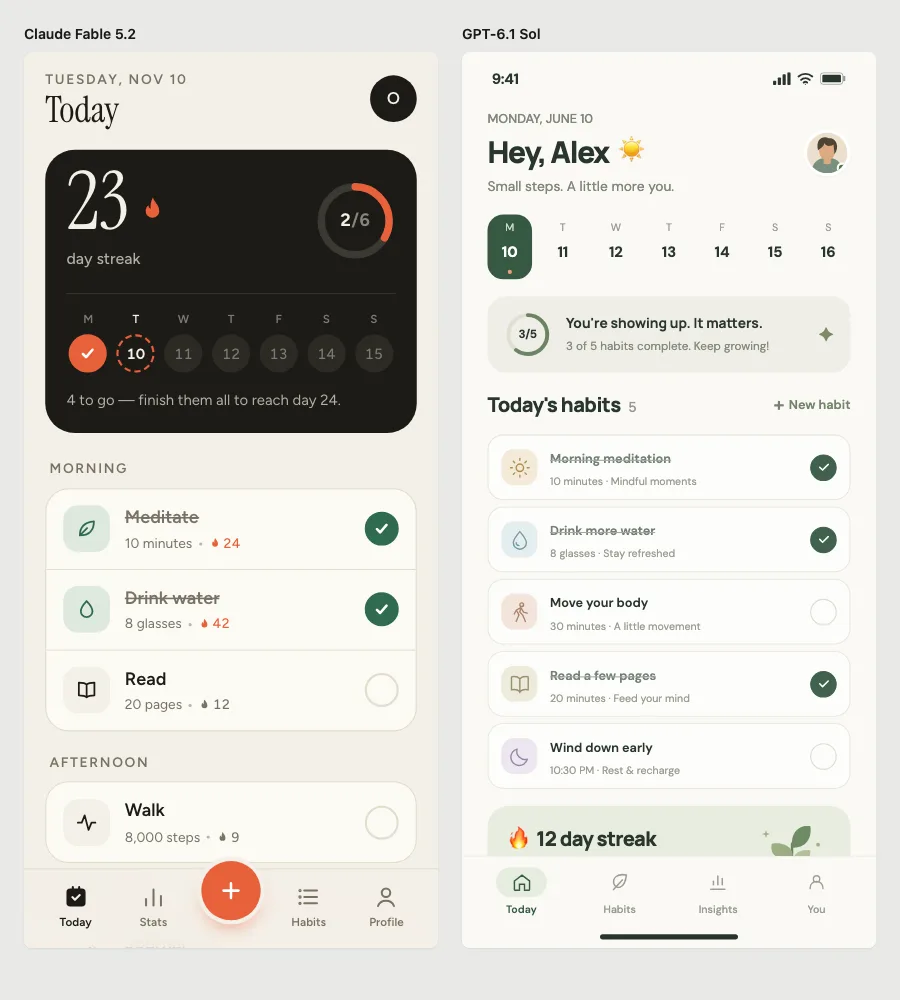
The mobile prompt. Fable 5.2 grouped habits by time of day and used line icons; Sol used a sun emoji in the greeting.
| Prompt | Model | Time | Fonts | Main color | Checker findings |
|---|---|---|---|---|---|
| Landing page | Fable 5.2 | 1:39 | Fraunces, DM Sans, DM Mono | Dark green and amber on cream | 0 errors; 4 small all-caps labels |
| Landing page | GPT-6.1 Sol | 2:16 | DM Sans, Manrope | Dark green on sage | 4 errors: emoji icons |
| Dashboard | Fable 5.2 | 1:55 | Inter | Indigo | 0 errors; Inter flagged as a default font |
| Dashboard | GPT-6.1 Sol | n/a | DM Sans | Blue and green | Emoji icons, placeholder names |
| Mobile app | Fable 5.2 | 1:51 | Instrument Serif, Figtree | Orange-red on cream | 0 errors; one backdrop blur |
| Mobile app | GPT-6.1 Sol | n/a | DM Sans, Manrope | Sage | 6 emoji icons |
At API prices, Claude Code reported $0.34 to $0.42 per screen. Token counts are not comparable between Claude Code and Codex, so we left them out.
What Fable 5.2 does well
- Real content. It wrote today’s date into the habit screen, used believable client and company names, and wrote copy that fits a freelancer (“You send the invoice. Tally does the chasing.”).
- Icons instead of emoji. Every icon was an inline SVG.
- Small details. The landing page had a status timeline under the invoice; the habit screen showed a streak count on each habit and what is left to reach tomorrow’s streak.
The look it defaults to
GPT-6.1 defaults to sage green and DM Sans. Fable 5.2 defaults to the look that took over after the purple-gradient years: a warm cream background, a serif headline with one word in italics, a dark green or orange accent, and small all-caps labels. It looks considered, but everyone who asks without direction gets it. And on the dashboard, with nothing to say about style, it fell back to Inter and indigo. We list these patterns in AI UI design tells.
With a design skill, it changes
Before the clean runs, we ran the same prompts in a normal Claude Code setup that had the open-source Taste Skill installed, and Claude Code loaded it on its own for all three. The results changed: Bricolage Grotesque and Hanken Grotesk instead of serifs, a lime accent on two of the three screens, and no checker warnings at all. A skill or a design system changes the result more than switching models does. See Taste Skill vs Impeccable vs UI UX Pro Max.
Before building, read DESIGN.md and use only its colors, fonts, radius and spacing. Don't default to a cream background with a serif headline, and don't use Inter. No small all-caps labels above headings. Use realistic content for [your product], then build [the screen].
How to use Fable 5.2 for design
- In Claude Code: start it with
claude --model claude-fable-5-2, or switch with/modelin a session. - In Codex: Codex runs OpenAI models. If you design in Codex, our GPT-6.1 Terra vs Sol test covers which one to use. Our open-source pretty-ui skill works in both agents.
- Pick a direction before the first screen: take a design system from our library, or write a DESIGN.md.
Frequently asked questions
Is Claude Fable 5.2 better than GPT-6.1 at UI design?
In our three prompts it avoided the obvious AI tells that both GPT-6.1 models showed, and its content felt more real. Its dashboard was the most generic screen in the test. Both produce polished screens; neither has taste you can rely on without direction.
How much does Claude Fable 5.2 cost?
On the API, $8 per million input tokens and $40 per million output tokens; fast mode costs $16 and $80. On Claude plans it is included in all paid plans, and on Pro and standard Team seats it can use up to half of your weekly limit.
Is Fable 5.2 available in Claude Code?
Yes. We ran this test in Claude Code with --model claude-fable-5-2. Fast mode for Fable 5.2 is also available in Claude Code.
Keep reading
- GPT-6.1 Terra vs Sol for UI designThe same three prompts in Codex, with screenshots, speed, and tokens.
- Codex vs Claude Code for UI designHow the two agents compare on design tools, previews, skills, and design systems.
- AI UI design tells, and how to avoid themTwelve signs a UI looks AI-made, and prompts that fix each one.